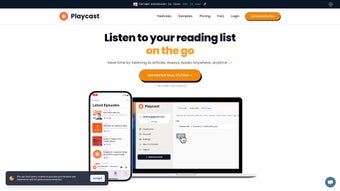

Download Playcast – AI‑Powered Text‑to‑Speech Converter, Free & Secure
Overview
Playcast.ai is a cloud‑based AI voice generator that transforms any written material into natural‑sounding audio. Whether you are a student juggling multiple assignments, a professional who needs to skim through lengthy reports, or a visually‑impaired user seeking an accessible reading experience, Playcast offers a seamless way to “listen” to your content while you work, commute, or relax. The platform leverages state‑of‑the‑art text‑to‑speech (TTS) algorithms and deep‑learning voice models to produce clear, human‑like narration across a variety of text formats—including PDFs, Word documents, web articles, personal notes, and even code snippets.
Because the service runs entirely in a web browser, there is no need to install bulky desktop software; a stable internet connection and a modern browser are all that’s required. Playcast’s user‑friendly interface lets you upload or paste text, select a voice (or let the AI choose the best match), and generate an audio file in seconds. The resulting MP3 can be streamed instantly or downloaded for offline listening, giving you full control over how and when you consume information.
In addition to boosting productivity, Playcast promotes inclusive learning by providing a free tier that removes many barriers for users with visual impairments or reading difficulties. While the tool is praised for its versatility and ease of use, it does have a few limitations—such as a modest selection of voice personas and occasional inconsistencies in pronunciation for highly technical jargon. Overall, Playcast positions itself as a practical, secure, and cost‑effective solution for anyone looking to convert text into audio without compromising on quality.
Key Features of Playcast
- AI‑Driven Natural Voices: Utilizes deep‑learning models to produce speech that mimics human intonation, pauses, and emphasis.
- Multi‑Format Support: Accepts plain text, PDFs, DOCX, HTML, and even markdown files, making it suitable for academic papers, business reports, and personal notes.
- Instant Streaming & Download: Listen to the generated audio directly in the browser or download an MP3 file for offline playback on any device.
- Customizable Playback Speed: Adjust the narration speed from 0.5x to 2x without distorting voice quality, perfect for rapid review or detailed listening.
- Cross‑Platform Accessibility: Works on Windows, macOS, Linux, Android, and iOS browsers, ensuring you can generate audio from any device.
- Secure Cloud Processing: All text is encrypted during transmission and automatically deleted after conversion, protecting sensitive information.
- Free Tier with Unlimited Conversions: Offers a generous free plan that includes up to 2 hours of audio per month, ideal for casual users.
- Premium Subscription Options: Unlock higher‑quality voices, batch processing, and priority rendering for power users and enterprises.
- API Access: Developers can integrate Playcast’s TTS engine into their own apps via a RESTful API, expanding its utility beyond the web interface.
- Language & Accent Variety: Supports English (US, UK, AU), Spanish, French, German, and more, with regional accents for a personalized listening experience.
Each feature is designed with the end‑user in mind. For instance, the adjustable playback speed allows learners to match the audio pace with their comprehension level, while the secure cloud processing ensures that confidential documents—such as legal contracts or medical records—remain private. The free tier’s unlimited conversions (subject to a monthly hour cap) make Playcast an attractive choice for students who need to listen to lecture notes without paying for a subscription. Meanwhile, businesses can benefit from the API and batch processing capabilities, automating the creation of audio guides, onboarding material, or accessibility‑compliant content at scale. By combining a robust feature set with a straightforward web interface, Playcast bridges the gap between sophisticated AI technology and everyday usability.
Installation & Usage Instructions
Because Playcast is a web‑based service, there is no traditional “installation” process. Follow these steps to start converting text to audio in just a few minutes:
- Create an Account: Visit Playcast.ai and click “Sign Up”. You can register using an email address or a single‑sign‑on option such as Google or Microsoft. A verification email will confirm your account.
- Choose a Plan: After logging in, you’ll be prompted to select a plan. The free tier requires no payment information, while premium options involve a monthly or annual subscription processed through Stripe.
- Upload or Paste Text: On the dashboard, click “New Conversion”. You can either drag‑and‑drop a file (PDF, DOCX, etc.) or paste raw text into the provided field. Playcast automatically detects the file type and extracts the readable content.
- Select a Voice & Settings: Choose from the available voice list. If you’re unsure, click “Auto‑Select” and let the AI recommend a voice that matches the document’s tone. Adjust playback speed, and optionally enable “Emphasis Mode” for technical terms.
- Generate Audio: Press “Convert”. The cloud engine processes the request, typically within 10‑30 seconds for standard documents. A progress bar shows the status.
- Listen or Download: Once conversion is complete, you can stream the audio directly or click “Download MP3”. The file is saved to your device and can be transferred to any media player, smartphone, or tablet.
- Manage Your Library: All completed conversions appear under “My Library”. From there, you can rename files, delete old recordings, or share a secure link with collaborators.
Compatibility: Playcast runs on any modern browser that supports HTML5 and Web Audio APIs, including Chrome, Firefox, Edge, Safari, and Opera. Because it is cloud‑based, the same experience is available on Windows 10/11, macOS Ventura or later, Linux distributions, as well as mobile browsers on Android 12+ and iOS 15+. No additional plugins or extensions are required, making it a truly cross‑platform solution.
For power users, the Playcast API offers programmatic access. After obtaining an API key from the “Developer” section of your account, you can send POST requests with JSON payloads containing the text, desired voice, and optional parameters. The API returns a signed URL to the generated MP3, which can be integrated into custom workflows—such as automated podcast creation or e‑learning platforms. Detailed documentation, example code snippets, and SDKs for Python, Node.js, and Java are provided on the developer portal.
Security best practices are baked into the workflow. All data transfers occur over HTTPS, and Playcast employs AES‑256 encryption for any temporary storage. Once the conversion completes, the original text and audio files are purged from the servers after 24 hours unless you choose to keep them in your personal library. This approach satisfies GDPR, CCPA, and other privacy regulations, giving users confidence that their sensitive information remains confidential.
Pros and Cons – A Balanced Review
Overall Rating: 4.5 out of 5 stars
Pros
- User‑friendly web interface that requires no installation.
- High‑quality, natural‑sounding AI voices across multiple languages.
- Generous free tier suitable for casual learners and students.
- Secure cloud processing with automatic data deletion.
- Flexible playback speed and easy download options.
- Robust API for developers and enterprise integrations.
- Cross‑platform compatibility (Windows, macOS, Linux, Android, iOS).
Cons
- Limited selection of premium voices compared to some paid competitors.
- Occasional mispronunciation of highly technical or domain‑specific terminology.
- Monthly audio hour cap on the free plan may be restrictive for power users.
- No offline desktop application for users who prefer a local solution.
- Batch processing is only available in premium subscriptions.
Frequently Asked Questions
Is Playcast free to use?
Yes, Playcast offers a free tier that includes up to 2 hours of audio conversion per month. The free plan provides access to the core features, such as basic voice selection, streaming, and MP3 download. If you need more hours or premium voices, you can upgrade to a paid subscription.
Which file formats can I convert?
Playcast supports plain text (.txt), PDF, Microsoft Word (.docx), HTML, and markdown (.md) files. The platform automatically extracts readable text from these formats, so you don’t need to copy‑paste content manually.
Can I use Playcast on my mobile device?
Absolutely. Since Playcast is web‑based, it works on any modern mobile browser (Chrome, Safari, Edge, etc.) on Android 12+ and iOS 15+. You can upload files, generate audio, and download MP3s directly to your phone or tablet.
Is my data safe during conversion?
Playcast encrypts all data in transit using HTTPS and temporarily stores files with AES‑256 encryption. After the conversion is complete, the original text and generated audio are automatically deleted from the server after 24 hours unless you save them in your personal library.
Do I need an internet connection to listen to the audio?
You can stream the audio directly from the browser, which requires an internet connection. However, you can also download the MP3 file to your device and listen offline at any time—perfect for travel or areas with limited connectivity.
Conclusion & Call to Action
Playcast stands out as a versatile, secure, and user‑centric AI voice generator that bridges the gap between reading and listening. Its web‑first approach eliminates the hassle of installing bulky software, while the combination of natural‑sounding voices and flexible playback controls makes it an invaluable tool for students, professionals, and anyone who prefers auditory consumption of information. The free tier provides generous access for casual users, and the premium plans unlock advanced capabilities for power users and businesses. While the voice library could be expanded and occasional pronunciation quirks may appear, these are minor trade‑offs compared to the overall value and convenience Playcast delivers.
Ready to transform your reading list into an audio library? Download Playcast now, create your free account, and start listening instantly. Experience the productivity boost, enhanced accessibility, and multitasking freedom that only AI‑driven text‑to‑speech can provide.



.png)



